
作者: imback 時間: 2023-7-18 22:10 標題: 裝完新顯卡,就困住左係bios出吸返黎???
本帖最後由 imback 於 2023-7-18 22:36 編輯
剛裝左張新顯卡入部機,又係window10
裝埋driver
蓋埋機箱蓋
入bios 開返resize bar
就一直重開機都係bios度
好似boot meun話
the system cannot find any bootable device
搵到呢條片教SET 個BIOS,又成功入返WINDOWS

LAUNCH CSM >ENABLE 開返佢就得!
https://www.youtube.com/watch?v=o-tVbdf0CZE
作者: antlee 時間: 2023-7-18 23:05
本帖最後由 antlee 於 2023-7-18 23:06 編輯
Resizable Bar 係UEFI only feature, 通常開咗就會自動熄CSM
如果你的Win10(Boot Manager/OS)仲裝喺用MBR partition table的ssd/hdd 的話可能出事...
你的Win10... https://www.hkepc.com/forum/redi ... 88&pid=41765927
作者: imback 時間: 2023-7-19 09:17
回覆 2# antlee
真係被佢d特殊操作搞死
裝新顯卡再開resize bar會導致咁煩問題!
作者: kk30 時間: 2023-7-19 09:38
Win 11 有咁的問題嗎
作者: imback 時間: 2023-7-19 09:58
回覆 4# kk30
咁而問問呢到有無人剛裝新電腦
又剛買左卡又剛要開resize bar
作者: imback 時間: 2023-7-19 21:38
回覆 2# antlee
請教係米唔可以開RESIZE BAR?
根據以下文章
https://www.asus.com/tw/support/FAQ/1046107/
作者: antlee 時間: 2023-7-19 22:22
回覆 6# imback
如果你必須要CSM enable先行到Windows的話就唔開得Resizable Bar(ReBar) (兩者不能同時enabled)
要玩ReBar的話的條件:
1. BIOS ReBar enabled (& CSM disabled) <-底板支援
2. Windows 要 UEFI mode (即裝Windows入GPT partition/甚至要UEFI mode入Windows Installer USB)
3. 夠新的display card... (所以N card可以睇N control panel, 其他或者要用GPUZ確認)
作者: imback 時間: 2023-7-19 22:27
回覆 7# antlee
我底版新買B760,無可能唔得?
第2項完全唔識搞
2. Windows 要 UEFI mode (即裝Windows入GPT partition/甚至要UEFI mode入Windows Installer USB)
GPUZ確認左唔得
作者: antlee 時間: 2023-7-19 22:35
回覆 8# imback
無咗CSM咁BIOS只認UEFI mode的Windows boot manager...
除非有其他方法將Windows boot manager由Legacy mode改做UEFI mode
不然只有重裝Windows...(用UEFI mode 的 Win10 USB installer/安裝Windows的SSD最好無partition table或者要GPT partition table)...
作者: imback 時間: 2023-7-19 22:39
回覆 9# antlee
要重裝WINDOW 10??
咁我成堆資料,又裝左既野又無哂??
咁請教下如再裝新WINDOW 10 究竟邊版又點SET?
印象上次去到HARDDISE分配果版,我就刪除又再入過,都唔知點為知正確
作者: antlee 時間: 2023-7-19 23:30
回覆 10# imback
呢點我不好答, 確實經驗不足(win 7 user)
1. 大概要確保隻SSD裝置前無partition table (用WinPE(e.g. USBOX)搞穩陣D), 邪門D嘅方法係用底板BIOS "Tool Menu"裡面的"ASUS Secure Erase" reset隻SSD(Warning: 記得backup SSD裡面重要資料, 因為會洗曬該SSD裡面所有資料)
->怕搞壞現有Win10的話, 只好用另一隻SSD(買新嘅SSD/借(or二手)一隻無partition table的SSD)裝Windows
2. CSM DISABLED-> 如果CPU無F字尾的話全程用內顯(iGPU)裝完Windows... (理論上: 無CSM=UEFI only. ref. 底板manual Ch. 9.1 CSM)
3. 只有裝OS的SSD安裝在底板, 裝好Windows之後先好插其他SSD/HDD...
作者: antlee 時間: 2023-7-19 23:40
如果無信心搞的話就keep it as it is (CSM enabled, 用而家的Windows就好)
作者: raylee 時間: 2023-7-20 00:04
本帖最後由 raylee 於 2023-7-20 11:07 編輯
回覆 antlee
要重裝WINDOW 10??
咁我成堆資料,又裝左既野又無哂??
咁請教下如再裝新WINDOW 10 究竟邊版又 ...
imback 發表於 2023-7-19 22:39

try :
disconnect your hdd
disable csm & enable resizebar
reboot
作者: antlee 時間: 2023-7-20 00:31
本帖最後由 antlee 於 2023-7-20 00:33 編輯
回覆 antlee
要重裝WINDOW 10??
咁我成堆資料,又裝左既野又無哂??
咁請教下如再裝新WINDOW 10 究竟邊版又 ...
imback 發表於 2023-7-19 22:39
MS官方方法 MBR2GPT.EXE (自己無試過, 你個case: boot manager喺另外HDD的情況之下能否重建好 我唔知道)
https://learn.microsoft.com/en-us/windows/deployment/mbr-to-gpt
TensForum tutorial
https://www.tenforums.com/tutorials/81502-convert-windows-10-legacy-bios-uefi-without-data-loss.html
用其他軟件(Option 1 or 2 only, 但Free version似乎做唔到)...
https://www.tenforums.com/tutorials/85750-convert-mbr-disk-gpt-disk-windows-10-a.html
作者: next000 時間: 2023-7-20 02:32
回覆 kk30
咁而問問呢到有無人剛裝新電腦
又剛買左卡又剛要開resize bar
imback 發表於 2023-7-19 09:58
如果重裝WINDOW…建議裝WINDOW 11
本月剛裝新電腦,使用Rufus制做安裝USB手指,只保留UEFI mode選項
裝完一點事都無
作者: imback 時間: 2023-7-20 08:54
本帖最後由 imback 於 2023-7-20 09:10 編輯
回覆 15# next000
rufus系咩黎?
都系同样用手指插usb装win 11?
作者: imback 時間: 2023-7-20 08:57
回覆 13# raylee
咁樣隻hdd永世唔用得?
作者: raylee 時間: 2023-7-20 09:03
本帖最後由 raylee 於 2023-7-20 09:05 編輯
回覆 raylee
咁樣隻hdd永世唔用得?
imback 發表於 2023-7-20 08:57
want to chk whether ssd or hdd need csm
chk first
作者: imback 時間: 2023-7-20 09:11
回覆 18# raylee
唉,今晚又要搬機拆野
身水身汗
部電腦攝左入櫃底
作者: raylee 時間: 2023-7-20 09:34
no pain no gain
作者: imback 時間: 2023-7-20 09:42
回覆 20# raylee
拔走hd兩條線後應該有兩個情況?
情況一,可以順利開resize bar
情況二,失敗
請教大家呢兩種情況既後續部驟要點做?
作者: hopkins 時間: 2023-7-20 10:02
我覺得為少少效能,搞一大輪唔值,不如你搵下效能增長到幾多,再衡量值唔值重裝。
via HKEPC IR 5.1.14 - Android(5.1.2F)
作者: raylee 時間: 2023-7-20 10:15
回覆 raylee
唉,今晚又要搬機拆野
身水身汗
部電腦攝左入櫃底
imback 發表於 2023-7-20 09:11
可試下直接在bios裡disable 隻hdd
作者: raylee 時間: 2023-7-20 10:18
本帖最後由 raylee 於 2023-7-20 11:06 編輯
回覆 raylee
拔走hd兩條線後應該有兩個情況?
情況一,可以順利開resize bar
情況二,失敗
請教大家呢兩種 ...
imback 發表於 2023-7-20 09:42
順利開晒即hdd 要enable csm, 唔得即ssd要enable csm
作者: imback 時間: 2023-7-20 11:00
回覆 23# raylee
我唔知搵邊個位置可以做?
作者: imback 時間: 2023-7-20 11:00
回覆 24# raylee
呢個我都唔識搞
作者: imback 時間: 2023-7-20 11:02
回覆 22# hopkins
可以係邊到查到?
前晚我用3d 軟件sketchup 整左一大堆立體公仔
都係拖畫面,唔流暢
係window 個效能,ram係用唔哂,有大量閑置
作者: raylee 時間: 2023-7-20 11:06
回覆 raylee
呢個我都唔識搞
imback 發表於 2023-7-20 11:00
step by step ok :
disconnect your hdd
disable csm & enable resizebar
reboot
順利開機即hdd 要enable csm, 唔得即ssd要enable csm
作者: next000 時間: 2023-7-20 11:46
回覆 next000
rufus系咩黎?
都系同样用手指插usb装win 11?
imback 發表於 2023-7-20 08:54
Rufus 是個能格式化並製作可開機 USB手指的軟件
https://rufus.ie/zh_TW/#
作者: imback 時間: 2023-7-20 12:33
回覆 29# next000
佢同我先係微軟個網下載隻野,執行佢整舊野入手指有無咩大分別?
作者: raylee 時間: 2023-7-20 12:42
回覆 kk30
咁而問問呢到有無人剛裝新電腦
又剛買左卡又剛要開resize bar
imback 發表於 2023-7-19 09:58
try to disable security boot
作者: next000 時間: 2023-7-20 13:40
回覆 next000
佢同我先係微軟個網下載隻野,執行佢整舊野入手指有無咩大分別? ...
imback 發表於 2023-7-20 12:33
分別是微軟那個手指內包含UEFI和CSM…不小心會裝錯
Rufus制做時可以不要CSM…
[img][/img]


 圖片附件: Rufus制做安裝USB手指.png (2023-7-20 13:40, 137.72 KB) / 下載次數 87
https://www.hkepc.com/forum/attachment.php?aid=2381777&k=e0288ad5fde94c666758f7fa02efbbf6&t=1786404588&sid=d70RSMNTJ0

作者: imback 時間: 2023-7-20 14:02
回覆 32# next000
裝win十都無呢d野揀
作者: imback 時間: 2023-7-20 14:10
回覆 31# raylee
呢個security boot係咩東西??
作者: raylee 時間: 2023-7-20 14:17
回覆 raylee
呢個security boot係咩東西??
imback 發表於 2023-7-20 14:10
https://poe.com/s/EmVTZp7B5HvFZcqARAbc
作者: next000 時間: 2023-7-20 14:29
回覆 next000
裝win十都無呢d野揀
imback 發表於 2023-7-20 14:02
點會無…
圖片附件: 螢幕擷取畫面 2023-07-20 142733.png (2023-7-20 14:29, 47.07 KB) / 下載次數 82https://www.hkepc.com/forum/attachment.php?aid=2381783&k=cae67c30cb369f9aa7bf822aa8d345be&t=1786404588&sid=d70RSMNTJ0

作者: imback 時間: 2023-7-20 14:52
回覆 36# next000
我意思上次裝win10
由微軟個網下載果隻,無你咁多野揀
作者: imback 時間: 2023-7-20 14:52
回覆 35# raylee
佢本身係咩來,背後做緊咩?
唔該
作者: raylee 時間: 2023-7-20 14:57
回覆 raylee
佢本身係咩來,背後做緊咩?
唔該
imback 發表於 2023-7-20 14:52
Secure Boot is a security standard that checks software for modifications before loading it. Disabling it may make your system less secure.
作者: next000 時間: 2023-7-20 15:10
本帖最後由 next000 於 2023-7-20 15:14 編輯
回覆 next000
我意思上次裝win10
由微軟個網下載果隻,無你咁多野揀
imback 發表於 2023-7-20 14:52
你用B760底板…CPU不是12代就是13代
要發揮大小核的效能,最好是WINDOW 11(針對大小核有優化)
所以建議裝WINDOW 11
反正現在你系統出了小小問題…倒不如重裝吧
作者: imback 時間: 2023-7-20 15:16
回覆 40# next000
又要花錢同大量時間搞個win 11
好苦呀
網上又唔見人分享講當中既差別
作者: next000 時間: 2023-7-20 15:23
本帖最後由 next000 於 2023-7-20 15:28 編輯
回覆 next000
又要花錢同大量時間搞個win 11
好苦呀
網上又唔見人分享講當中既差別 ...
imback 發表於 2023-7-20 15:16
只要你有WINDOW 10金鑰,可以用在WINDOW 11
我之前都是用WINDOW 10,出新機才用WINDOW 11…用落分別不大
作者: imback 時間: 2023-7-20 15:26
回覆 42# next000
係個四方型框,四個角變左圓角
好似幾乎差唔多
作者: hopkins 時間: 2023-7-20 17:10
回覆 hopkins
可以係邊到查到?
前晚我用3d 軟件sketchup 整左一大堆立體公仔
都係拖畫面,唔流暢
係wind ...
imback 發表於 20-7-2023 11:02
3d軟件唔知。睇遊戲測試好多時唔會有多過4%提升。
via HKEPC IR 5.1.14 - Android(5.1.2F)
作者: imback 時間: 2023-7-20 18:20
回覆 44# hopkins
我主要係工作用,特別係渲染效果
作者: imback 時間: 2023-7-20 19:08
回覆 28# raylee
蚊走hd線
resize bar開左
入唔到
window
請教下一步操作?
作者: imback 時間: 2023-7-20 19:10
回覆 31# raylee
無呢個選項
作者: raylee 時間: 2023-7-20 19:48
回覆 raylee
無呢個選項
imback 發表於 2023-7-20 19:10
https://rog.asus.com/hk/support/FAQ/1049829
作者: raylee 時間: 2023-7-20 19:54
回覆 raylee
蚊走hd線
resize bar開左
入唔到
window
請教下一步操作?
imback 發表於 2023-7-20 19:08
https://poe.com/s/QTmGsa9qF68ZLKtZ8YMV
作者: imback 時間: 2023-7-20 20:03
回覆 49# raylee
如果有圖就好,一堆字又要靠估
作者: raylee 時間: 2023-7-20 20:05
回覆 raylee
如果有圖就好,一堆字又要靠估
imback 發表於 2023-7-20 20:03
https://poe.com/s/eMFBt3a5JHmaMnelEuGn
作者: imback 時間: 2023-7-20 21:03
回覆 48# raylee
輸入msinfo32
安全開機狀態不支援
作者: imback 時間: 2023-7-20 21:25
本帖最後由 imback 於 2023-7-20 21:26 編輯
回覆 51# raylee
係米要轉換成GPT?

作者: raylee 時間: 2023-7-20 21:34
回覆 raylee
係米要轉換成GPT?
imback 發表於 2023-7-20 21:25
already backup ? yes
作者: imback 時間: 2023-7-20 21:35
本帖最後由 imback 於 2023-7-20 21:37 編輯
回覆 54# raylee
唔識點轉,條片好似入去COMMAND MODE 打野?
作者: raylee 時間: 2023-7-20 21:37
回覆 raylee
唔識點轉,條片好入去COMMAND MODE 打野?
imback 發表於 2023-7-20 21:35
select "V"
作者: imback 時間: 2023-7-20 21:40
回覆 56# raylee
即係點???
作者: raylee 時間: 2023-7-20 21:41
本帖最後由 raylee 於 2023-7-20 21:50 編輯
回覆 raylee
即係點???
imback 發表於 2023-7-20 21:40
use MBR2GPT.EXE
https://learn.microsoft.com/en-us/windows/deployment/mbr-to-gpt
Make sure you back up any important data on the disk before converting. The tool claims to be non-destructive, but it's always good to have a backup.
Open a Command Prompt as Administrator.
Type: cd (location where you extracted mrbtogpt.exe)
This will change the command prompt to that folder.
Type: mrbtogpt.exe (disk number)
Where (disk number) is the number of the disk you want to convert, like 0 for C:\ or 1 for D:\ and so on.
You'll be prompted to confirm the conversion. Type Y and hit Enter.
The tool will now start converting the disk from MBR to GPT and updating the partition table.
Once complete, it will tell you the conversion finished successfully. You'll now have a GPT disk instead of MBR.
Reboot your system for the changes to take full effect.
作者: imback 時間: 2023-7-20 21:51
回覆 58# raylee
打左句mbr2gpt /convert,彈左下面句野:
c:\Windows\System32>mbr2gpt /convert
ERROR: MBR2GPT can only be used from the Windows Preinstallation Environment. Use /allowFullOS to override.
作者: raylee 時間: 2023-7-20 22:00
回覆 raylee
打左句mbr2gpt /convert,彈左下面句野:
c:\Windows\System32>mbr2gpt /convert
ERROR: MBR2G ...
imback 發表於 2023-7-20 21:51
mbr2gpt /allowFullOS
作者: imback 時間: 2023-7-20 22:09
本帖最後由 imback 於 2023-7-20 22:10 編輯
回覆 60# raylee
打左你比果句野,然後再試都一樣
c:\Windows\System32>mbr2gpt /convert
ERROR: MBR2GPT can only be used from the Windows Preinstallation Environment. Use /allowFullOS to override.
作者: raylee 時間: 2023-7-20 22:15
回覆 raylee
打左你比果句野,然後再試都一樣
c:\Windows\System32>mbr2gpt /convert
ERROR: MBR2GPT can ...
imback 發表於 2023-7-20 22:09
type
"mbr2gpt /allowFullOS"
ERROR: MBR2GPT can only be used from the Windows Preinstallation Environment. Use /allowFullOS to override
?
作者: imback 時間: 2023-7-20 22:17
本帖最後由 imback 於 2023-7-20 22:18 編輯
回覆 62# raylee
c:\Windows\System32>mbr2gpt /allowFullOS
Invalid arguments
Converts a disk from MBR to GPT partitioning without modifying or deleting data on the disk.
MBR2GPT.exe /validate|convert [/disk:<diskNumber>] [/logs:<logDirectory>] [/map:<source>=<destination>] [/allowFullOS]
Where:
/validate
- Validates that the selected disk can be converted
without performing the actual conversion.
/convert
- Validates that the selected disk can be converted
and performs the actual conversion.
/disk:<diskNumber>
- Specifies the disk number of the disk to be processed.
If not specified, the system disk is processed.
/logs:<logDirectory>
- Specifies the directory for logging. By default logs
are created in the %windir% directory.
/map:<source>=<destination>
- Specifies the GPT partition type to be used for a
given MBR partition type not recognized by Windows.
Multiple /map switches are allowed.
/allowFullOS
- Allows the tool to be used from the full Windows
environment. By default, this tool can only be used
from the Windows Preinstallation Environment.
c:\Windows\System32>mbr2gpt /convert
ERROR: MBR2GPT can only be used from the Windows Preinstallation Environment. Use /allowFullOS to override.
c:\Windows\System32>mbr2gpt /allowFullOS
Invalid arguments
Converts a disk from MBR to GPT partitioning without modifying or deleting data on the disk.
MBR2GPT.exe /validate|convert [/disk:<diskNumber>] [/logs:<logDirectory>] [/map:<source>=<destination>] [/allowFullOS]
Where:
/validate
- Validates that the selected disk can be converted
without performing the actual conversion.
/convert
- Validates that the selected disk can be converted
and performs the actual conversion.
/disk:<diskNumber>
- Specifies the disk number of the disk to be processed.
If not specified, the system disk is processed.
/logs:<logDirectory>
- Specifies the directory for logging. By default logs
are created in the %windir% directory.
/map:<source>=<destination>
- Specifies the GPT partition type to be used for a
given MBR partition type not recognized by Windows.
Multiple /map switches are allowed.
/allowFullOS
- Allows the tool to be used from the full Windows
environment. By default, this tool can only be used
from the Windows Preinstallation Environment.
作者: raylee 時間: 2023-7-20 22:21
回覆 raylee
c:\Windows\System32>mbr2gpt /allowFullOS
Invalid arguments
Converts a disk from MBR ...
imback 發表於 2023-7-20 22:17
Open a Command Prompt as Administrator
Type: cd (location where you extracted mrbtogpt.exe)
Type the command with the /allowFullOS flag:
mrbtogpt.exe /allowFullOS (disk number)
Confirm the conversion when prompted.
The conversion will start.
作者: imback 時間: 2023-7-20 22:23
回覆 64# raylee
唔明先打d咩?c:\Windows\System32>後面要打咩字?
作者: raylee 時間: 2023-7-20 22:28
回覆 raylee
唔明先打d咩?c:\Windows\System32>後面要打咩字?
imback 發表於 2023-7-20 22:23
mrbtogpt.exe /allowFullOS 1
作者: imback 時間: 2023-7-20 22:31
回覆 66# raylee
c:\Windows\System32>mrbtogpt.exe /allowFullOS 1
'mrbtogpt.exe' 不是內部或外部命令、可執行的程式或批次檔。
作者: imback 時間: 2023-7-20 22:39
C:\Windows\system32>MBR2GPT.EXE /CONVERT /DISK:1 /allowfullos
MBR2GPT will now attempt to convert disk 1.
If conversion is successful the disk can only be booted in GPT mode.
These changes cannot be undone!
MBR2GPT: Attempting to convert disk 1
MBR2GPT: Retrieving layout of disk
MBR2GPT: Validating layout, disk sector size is: 512 bytes
MBR2GPT: Trying to shrink the system partition
MBR2GPT: Creating the EFI system partition
MBR2GPT: Installing the new boot files
MBR2GPT: Performing the layout conversion
MBR2GPT: Migrating default boot entry
MBR2GPT: Adding recovery boot entry
MBR2GPT: Fixing drive letter mapping
MBR2GPT: Conversion completed successfully
Call WinReReapir to repair WinRE
MBR2GPT: Failed to update ReAgent.xml, please try to manually disable and enable WinRE.
MBR2GPT: Before the new system can boot properly you need to switch the firmware to boot to UEFI mode!
作者: raylee 時間: 2023-7-20 22:50
C:\Windows\system32>MBR2GPT.EXE /CONVERT /DISK:1 /allowfullos
MBR2GPT will now attempt to convert d ...
imback 發表於 2023-7-20 22:39
https://poe.com/s/FnG5ILMMcRAVeouYezO5
作者: imback 時間: 2023-7-20 22:55
本帖最後由 imback 於 2023-7-20 22:56 編輯
回覆 69# raylee
謝謝你幫手
成晚時間都搞唔店
https://www.youtube.com/watch?v=ytRJhwL6vAg
跟左條片都係唔得
太複雜
有無免費野可以搞?
網上介紹兩個都收大費!
作者: raylee 時間: 2023-7-20 22:57
本帖最後由 raylee 於 2023-7-20 23:11 編輯
回覆 raylee
謝謝你幫手
成晚時間都搞唔店
跟左條片都係唔得
太複雜
有無免費野可以搞?
網上介紹兩個都 ...
imback 發表於 2023-7-20 22:55
success or fail ?
After running mbr2gpt.exe /allowfullos:
Run WinREpair.exe to repair Windows Recovery Environment
Disable then re-enable Windows RE from Control Panel
Enable UEFI boot mode in your BIOS settings
Reboot and ensure the system can boot properly from the converted GPT disk
作者: raylee 時間: 2023-7-20 23:07
回覆 raylee
謝謝你幫手
成晚時間都搞唔店
跟左條片都係唔得
太複雜
有無免費野可以搞?
網上介紹兩個都 ...
imback 發表於 2023-7-20 22:55
https://www.diskpart.com/article ... rter-7201.html#H3-3
3) AOMEI Partition Assistant Standard
作者: chinwah 時間: 2023-7-21 01:14
本帖最後由 chinwah 於 2023-7-21 01:16 編輯
C:\Windows\system32>MBR2GPT.EXE /CONVERT /DISK:1 /allowfullos
MBR2GPT will now attempt to convert d ...
imback 發表於 2023-7-20 22:39
你呢句出咗問題丫嘛
MBR2GPT: Failed to update ReAgent.xml, please try to manually disable and enable WinRE.
所以先要試停咗WINRE再開番佢, 下面2句COMMAND嚟, 先DISABLE, 後ENABLE
reagentc /disable
reagentc /enable
試完上面2句COMMAND,再行多次
MBR2GPT /convert /allowfullos
作者: imback 時間: 2023-7-21 08:19
回覆 72# raylee
琴晚試左其中呢個牌子唔知邊款
最後佢都要收左錢先可以下一步
作者: imback 時間: 2023-7-21 08:20
回覆 73# chinwah
好的,今晚再戰
唔該兩位大俠
作者: Louis_gre2 時間: 2023-7-21 08:27
回覆 raylee
琴晚試左其中呢個牌子唔知邊款
最後佢都要收左錢先可以下一步 ...
imback 發表於 2023-7-21 08:19
AOMEI 我試左 (手指 boot 起機式),失敗。
等你今晚的報告
作者: imback 時間: 2023-7-21 09:09
回覆 76# Louis_gre2
網上有兩篇文教轉換
推左兩隻又無先講明先付款後使用
安裝左最尾下一步叫付款

作者: imback 時間: 2023-7-21 18:54
死火
一開機黑畫面
只有一句
reboot and select proper boot device or insert boot media in select boot device andpress a key
作者: raylee 時間: 2023-7-21 18:57
本帖最後由 raylee 於 2023-7-21 18:58 編輯
死火
一開機黑畫面
只有一句
reboot and select proper boot device or insert boot media in select boot ...
imback 發表於 2023-7-21 18:54
enter bios to set uefi, ie disable csm
作者: imback 時間: 2023-7-21 19:00
回覆 79# raylee
入唔到去bios
作者: raylee 時間: 2023-7-21 19:02
回覆 raylee
入唔到去bios
imback 發表於 2023-7-21 19:00
拔電源線拔電池等30秒重開牛boot 机按DEL制入bios
作者: imback 時間: 2023-7-21 19:05
回覆 81# raylee
又神奇地可以入到WINDOWS
咩都無搞個,本來想插隻WIN 十手指試下
見仍無閃,就蚊返出黎
作者: imback 時間: 2023-7-21 19:07
奇怪而家變左GPT???

作者: raylee 時間: 2023-7-21 19:14
奇怪而家變左GPT???
imback 發表於 2023-7-21 19:07
csm off, resizebar on, hdd connected
作者: imback 時間: 2023-7-21 19:14
請教正確成功啟動RESIZE BAR步驟?
作者: raylee 時間: 2023-7-21 19:15
請教正確成功啟動RESIZE BAR步驟?
imback 發表於 2023-7-21 19:14
now resizebar on/off ?
作者: imback 時間: 2023-7-21 19:16
回覆 86# raylee
OFF
作者: raylee 時間: 2023-7-21 19:18
本帖最後由 raylee 於 2023-7-21 19:20 編輯
回覆 raylee
OFF
imback 發表於 2023-7-21 19:16
https://poe.com/s/7RJo6fPh4CcbjCUYFE7o
https://www.asus.com/HK/support/FAQ/1046107
作者: imback 時間: 2023-7-21 19:21
回覆 88# raylee
再入BIOS 開RESIZE BAR
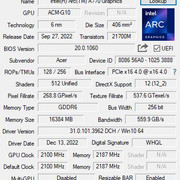
作者: raylee 時間: 2023-7-21 19:28
回覆 raylee
再入BIOS 開RESIZE BAR
imback 發表於 2023-7-21 19:21
congratulations
hdd connected ?
作者: imback 時間: 2023-7-21 19:52
回覆 90# raylee
麥都無搞過
開電腦就彈上面句野黑畫面
插隻手指試下
好似無反應
重開電
好似按左第四次又成功入左bios畫面又即入window
之後睇又成功轉成硬碟格式
再試resize bar又得左
作者: raylee 時間: 2023-7-21 20:16
回覆 raylee
麥都無搞過
開電腦就彈上面句野黑畫面
插隻手指試下
好似無反應
重開電
好似按左第四次又成 ...
imback 發表於 2023-7-21 19:52
hdd connected ?
作者: imback 時間: 2023-7-21 21:01
回覆 92# raylee
係,咩都好正常,係個HDMI有D怪
一開電個MON就有字"HDMI 什麼線號無訊號",藍畫面
兩秒左右,之後閃左入WINDOW
作者: raylee 時間: 2023-7-21 21:14
回覆 raylee
係,咩都好正常,係個HDMI有D怪
一開電個MON就有字"HDMI 什麼線號無訊號",藍畫面
兩秒左右,之 ...
imback 發表於 2023-7-21 21:01
顯示屏菜單中"Source"或"Input"連線選項,然後選擇"Auto-Configure"或"Auto-Adjust
作者: imback 時間: 2023-7-21 21:39
回覆 94# raylee
佢無呢個功能
ASUS VX239
作者: BlackJack 時間: 2023-7-21 23:58
追完左個post,
請問功效有冇提升?
作者: imback 時間: 2023-7-22 08:53
回覆 96# BlackJack
我無裝專業軟件測試
普通3d modiling 軟件只用sketchup
載入大量立體
佢始終用唔盡記憶體,大約幾%
唔知網上有無人識搞隻野可釋放更多記憶體
作者: imback 時間: 2023-7-22 08:54
回覆 94# raylee
之前未裝新卡用dvi插頭無呢個藍畫面情況
作者: imback 時間: 2023-7-22 21:45
試睇8K大片


作者: raylee 時間: 2023-7-22 23:02
試睇8K大片
imback 發表於 2023-7-22 21:45
your 13600k igpu already able to handle 8k video
no need A770