
作者: stanley_chung 時間: 2017-12-1 13:17 標題: QNAP SSD Read-Write Cache
本帖最後由 stanley_chung 於 2017-12-1 13:29 編輯
最終,都忍唔到手,買條 M.2 SSD 插埋另一條槽。
Create SSD cache 時,我發現可以用Single SSD,create Read-Write Cache. 先講下目前Config
System Volume: M.2 SSD 240G
Data Volume: Raid 5 @ 3TB
SSD Cache (Read-Write): M.2 SSD 120G
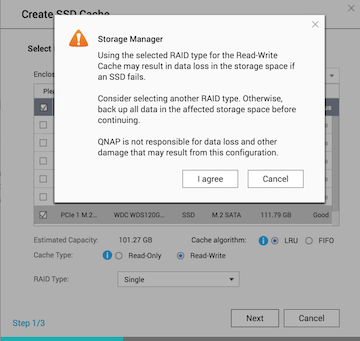
Create SSD Cache,可選擇 Read-Write


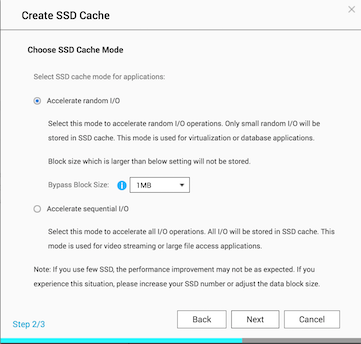
選Random I/O or Sequential I/O, 我選了 Random with default 1MB Bypass Block Size
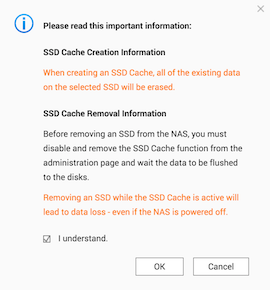
最後Step, 出warning 問是否take risk of data lost
有以下問題想請教
1. 排除壞SSD,write cache 會在指定時間,寫入收harddisk? 如何知道幾時寫 (有schedule)
2. 本身system volume (連VM program and VM image) 已儲在SSD, 有沒有必要提供SSD cache 俾 system volume?
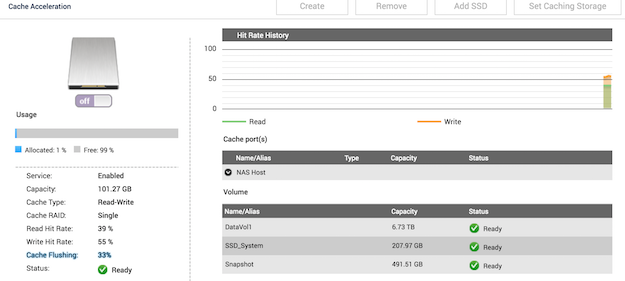
3. 當disable SSD Read-write SSD cache 時,會出現 cache flushing。完成後,就可確保Write cache 內容全部寫入Harddisk 而沒有data loss?
 圖片附件: Cache flushing.png (2017-12-1 13:08, 61.21 KB) / 下載次數 29
https://www.hkepc.com/forum/attachment.php?aid=2026994&k=1190ba0bdc72958bf4c7aecbb089f5bf&t=1782022963&sid=L2TLubVniP
 圖片附件: Final.png (2017-12-1 13:08, 44.59 KB) / 下載次數 42
https://www.hkepc.com/forum/attachment.php?aid=2026995&k=7c1321abecc67aa9a1b1eb1986c2de21&t=1782022963&sid=L2TLubVniP
 圖片附件: Step 1.png (2017-12-1 13:08, 55.61 KB) / 下載次數 33
https://www.hkepc.com/forum/attachment.php?aid=2026996&k=2064c6cebca3afd7565a6c38ef177d3c&t=1782022963&sid=L2TLubVniP
 圖片附件: Step 2.png (2017-12-1 13:08, 52.17 KB) / 下載次數 34
https://www.hkepc.com/forum/attachment.php?aid=2026997&k=70dfef64ae946c7f3c873793b66192d1&t=1782022963&sid=L2TLubVniP
作者: ctkelvin 時間: 2017-12-1 16:53
回覆 1# stanley_chung
Q1: Each vendor has their own algorithm to do cache flushing, better to check with QNAP support/whitepaper.
Q2: It is unnecessary to cache your system volume which is already in SSD.
Q3: Yes.
作者: iamderek 時間: 2017-12-1 17:33
Q1:無指定時間,無schedule。
然而,其實數據並未真正寫入硬碟的檔案系統內,當暫存的數據過多、暫存的時間過長、需要拍攝快照或停用SSD Cache功能等情況下,才會觸發回寫,把資料寫回硬碟內。
from x最快.hk
作者: talcans 時間: 2017-12-4 18:07
Q1:無指定時間,無schedule。
from
iamderek 發表於 2017-12-1 17:33

我有兩隻Sata ssd,唔知可唔可以1隻做System volume, 1隻做ssd cache
via HKEPC IR Pro v2.1.0 - iPhone
作者: stanley_chung 時間: 2017-12-4 19:06
我現在就是用一隻SSD 起system volume, 另一隻SSD 做 SSD cache (read-write mode)
作者: iamderek 時間: 2017-12-4 23:17
如果你唔介意冧system volume後停機一兩日重新設定,又唔介意寫入R/W cache嘅嘢會因為壞SSD而無哂,絕對可以咁用。
我自己就將最重要嘅資料放哂上NAS,所以system volume行SSD RAID-1。等4.3.4正式發表後,再加2隻SSD RAID-1行Qtier,補充我現在的HD RAID-5。