
作者: kenn 時間: 2018-2-9 11:49 標題: How to change Windows 10 Date Format
Newly installed a new computer with Windows 10. I wish to change the date format to yyyy-mm-dd but in vain because Windows 10 only allows me to opt either "d/M/yyyy" or "d MMMM yyyy".
Please help. Thanks.
作者: mdws2002 時間: 2018-2-9 12:06
Newly installed a new computer with Windows 10. I wish to change the date format to yyyy-mm-dd but ...
kenn 發表於 2018-2-9 11:49

唔係一直都係一樣?
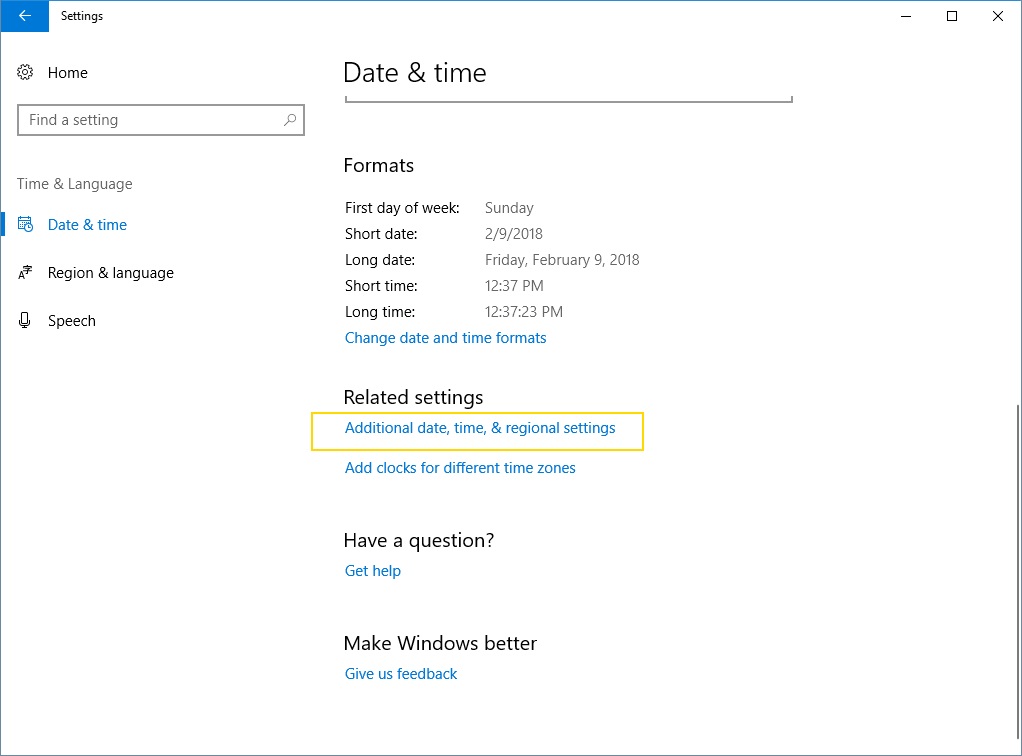
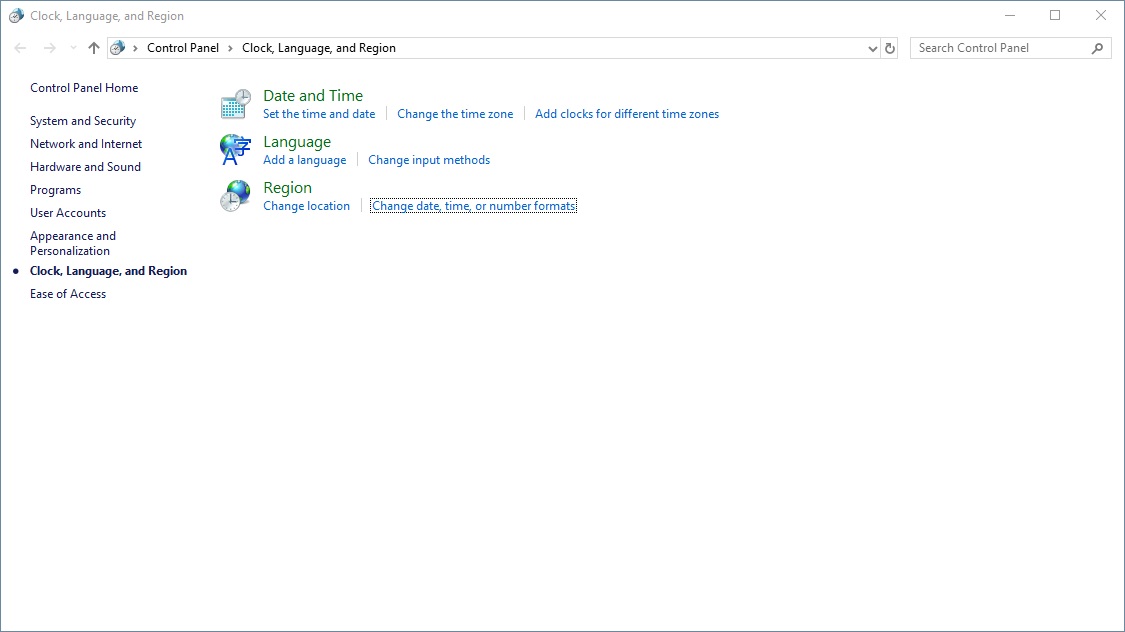
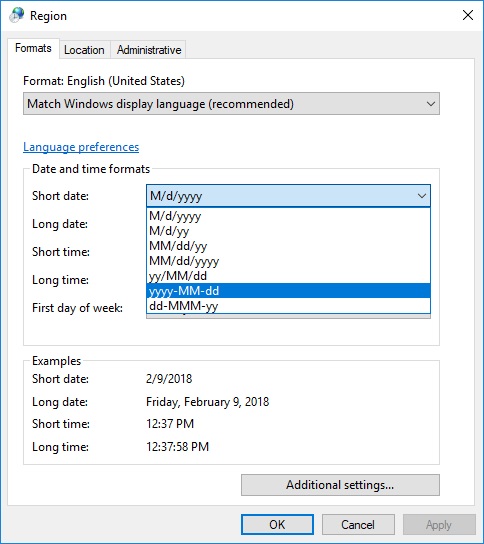
「控制台」>「語言」>「變更日期、時間或數字格式」>「格式」>「其他設定」>「日期」>「日期格式」。
作者: kenn 時間: 2018-2-9 12:23
It is OK in my old computer. The options offered in new computer only allows me to choose "d/M/yyyy" or "d MMMM yyyy". I don't know why.
Anyway, thanks for your reply.
作者: kenn 時間: 2018-2-9 12:26
In my old computer (recently broke down due to hardware failure of X79 mother board), there are many options for me to choose, but not this new one (with X299 mother board).
作者: justiceice 時間: 2018-2-9 13:23
see attached
 圖片附件: a.jpg (2018-2-9 13:22, 79.59 KB) / 下載次數 44
https://www.hkepc.com/forum/attachment.php?aid=2040977&k=67908daf38d552c1abf5f2198de306da&t=1781420992&sid=uKcaVbesNP
 圖片附件: b.jpg (2018-2-9 13:22, 74.03 KB) / 下載次數 57
https://www.hkepc.com/forum/attachment.php?aid=2040978&k=a6fcba1d56cf0531ae5f68c3a6ecd152&t=1781420992&sid=uKcaVbesNP
 圖片附件: c.jpg (2018-2-9 13:22, 68.57 KB) / 下載次數 45
https://www.hkepc.com/forum/attachment.php?aid=2040979&k=86882708d23d9e5650f69d30b73b1616&t=1781420992&sid=uKcaVbesNP
作者: mdws2002 時間: 2018-2-9 14:23
It is OK in my old computer. The options offered in new computer only allows me to choose "d/M/yyyy ...
kenn 發表於 2018-2-9 12:23
Impossible。
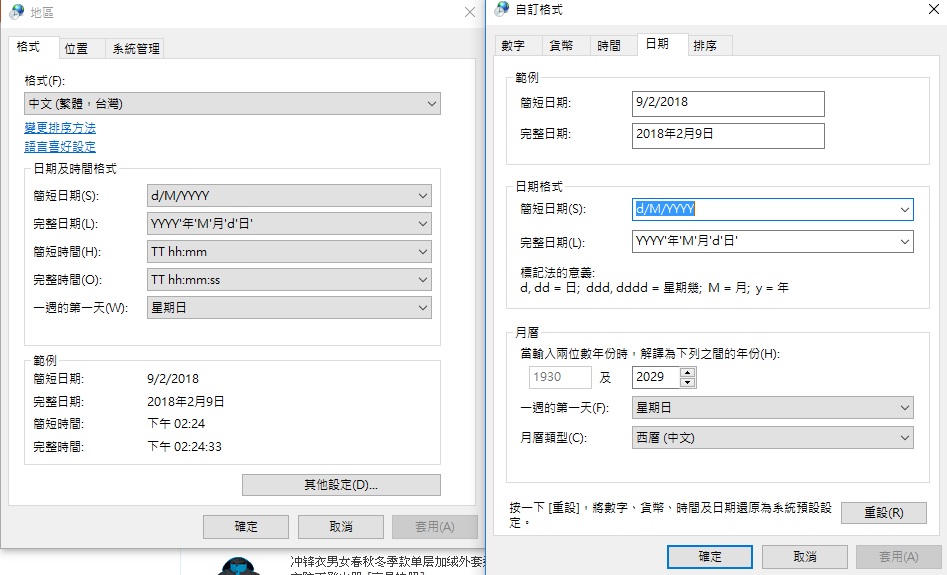
我寫嗰part,係俾你自己隨意打㗎喎。唔係揀。
P.S︰年份嘅y要用Y,而非佢所指示嘅y。
即你想顯示「d/M/yyyy」,應輸入「d/M/YYYY」。
作者: mdws2002 時間: 2018-2-9 14:26


補返張圖先。
P.s︰我自己部機真係唔知點解用細y會話你格式錯誤,大Y則無問題。
圖片附件: date.jpg (2018-2-9 14:25, 130.85 KB) / 下載次數 84https://www.hkepc.com/forum/attachment.php?aid=2040999&k=09451a26c19ba7ae15c8d73971dc4492&t=1781420992&sid=uKcaVbesNP
作者: kenn 時間: 2018-2-9 14:39
謝謝2位師兄解答,待我今晚回家後試試。🙏🙏
作者: anon893 時間: 2018-2-9 15:11
In my old computer (recently broke down due to hardware failure of X79 mother board), there are many ...
kenn 發表於 2018-2-9 12:26 PM
A bit OT here but my advice is, don't give up on it
Have it fixed at New Capital by a pro
After that, the MB should be good for at least a few more years
作者: kenn 時間: 2018-2-9 23:57
@justiceice and @mdws2002: Thanks.
Manually typed the required date format. Problem solved.
@anon893: My Rampage 4 Black (X79 board) could not be booted up a week ago. The computer light turned on for one second and turned off, then automatically repeated the process a second later. Not even started any booting process. So it should be hardware failure of the mother board. I then reassembled a new PC with X299 motherboard and i9-7920K; Windows 10 Pro was installed instead of Win 7 Ultimate. New computer works fine except the date format issue.
P.S. I will sell out the following spareparts after the Chinese New Year -
- CPU ~ i7-3930K (never over-clocked)
- RAM ~ 48GB Corsair Dominator Platinum @2133MHz (4*8GB + 4*4GB)
- CPU Cooling ~ Corsair H100i
- Case ~ Cooler Master HAF 932
- M/B ~ Rampage 4 Black (all overclocking spare parts had never been used, still sealed and unopened)
作者: anon893 時間: 2018-2-10 15:12
回覆 10# kenn
Are you sure it's the MB that fails, or it's the PSU that is acting iffy?
Anyway New Capital has at least two stores for repairing MBs, GPUs etc. you might want to send yours to check...
After all, it's not worthwhile to give up on the x79 MB
If for any reason you need a backup machine w/w7 support then that x79 MB would be your rescue
BTW I would love to get a good used (VG+ to mint) x79 MB but my choice is currently limited to Asux X79 Dlx
作者: kenn 時間: 2018-2-10 16:15
本帖最後由 kenn 於 2018-2-10 17:50 編輯
回覆 11# anon893
My PSU(Corsair AX860i) is working fine and is now installed in my new PC. Up to now, not very sure whether the problem is due to my X79 mother board (Rampage 4 Black) or not. But since it had been used for over 3 years and I wanted to upgrade my computer with more RAMs, so I finally bought the X299 TUF board and i9-7920X cpu. I need more RAMs (now 64GB) for photo editing purpose.
作者: anon893 時間: 2018-2-10 22:48
回覆 anon893
My PSU(Corsair AX860i) is working fine and is now installed in my new PC. Up to now, ...
kenn 發表於 2018-2-10 04:15 PM
Photo editing purpose...
In other words, you're probably using Adobe CC or something like that (can't install CS6 on w10 AFAIK)
Anyway you can't go wrong if you have the old x79 checked and repaired at New Capital...
Especially, if you want to sell it, you need to make sure it's all healthy
作者: kenn 時間: 2018-2-10 23:59
回覆 13# anon893
Yes, Photoshop CC is installed in my PC. I may take the old X79 board for a check when I am free. Thanks for your advice.
作者: anon893 時間: 2018-2-11 18:01
回覆 anon893
I may take the old X79 board for a check w ...
kenn 發表於 2018-2-10 11:59 PM
Must do it...
If you want to sell it, then be a responsible seller
作者: kenn 時間: 2018-2-12 13:06
回覆 15# anon893
The repair centre refused to carry out any checking because the board was not purchased from them AND expiry of the warranty. If I sell it, it will be described as "defective" instead of "functioning". At least the other spare parts (still sealed and un-used) may be valued a few hundred dollars.
作者: anon893 時間: 2018-2-13 12:09
回覆 anon893
The repair centre refused to carry out any checking because the board was not purchas ...
kenn 發表於 2018-2-12 01:06 PM
That's impossible
Which repair centre did you visit? Did you try Sun Technology at New Capital?
AFAIK NO independent repair shops would refuse even checking unless under very very special circumstances