
作者: ARM 時間: 2023-12-23 16:05 標題: Windows用5k mon會唔會清過4k好多?(#4有答案)
本帖最後由 ARM 於 2023-12-31 15:28 編輯
https://www.quora.com/Why-do-iMac-use-5K-display-instead-of-4K
啱啱先知原來Mac機用5k係為咗做到完整4倍解像度
想知Windows用5k mon (Scale 200%)係咪可以畀到比4k+1k更多嘅清晰度
-------------------------------------------------------------------------
答案喺#4
作者: KinChungE 時間: 2023-12-23 21:28
不論windows/mac都可以4k/5k mon做到完整200%
最大分別係多左位做野, 唔係清晰度
作者: ARM 時間: 2023-12-24 12:05
本帖最後由 ARM 於 2023-12-25 13:14 編輯
不論windows/mac都可以4k/5k mon做到完整200%
最大分別係多左位做野, 唔係清晰度
KinChungE 發表於 2023-12-23 21:28

試咗4K 200%大到做唔到野
其實準確啲講我嘅問題係200%(整數放大)會唔會比150%清咗
作者: ARM 時間: 2023-12-31 10:55
本帖最後由 ARM 於 2023-12-31 15:10 編輯
https://www.youtube.com/watch?v=Ee1Z5pK5tl4
我諗呢條片畀咗答案我
1:17:28 見到150%同200%喺舊Windows app上嘅分別
總結
要喺Windows上拎最到最清晰嘅體驗就要用整數Scale (例如200%)
但喺4k mon用200%一般嚟講太大
所以最理想都應該係用5K mon再開200% scale
唔怪得Surface studio個mon要去到4500 x 3000
作者: hkpagybid 時間: 2024-1-6 08:37
本帖最後由 hkpagybid 於 2024-1-6 09:04 編輯
應該係講緊Apple個Retina display技術?
真係靚好多
睇下x登有人post出黎既比較圖
https://lih.kg/wDRrGzX
唔知有無理解錯
Retina display係 硬件+軟件結合出黎
硬件高解像度MON
再加
MACOS軟件將像素4合1再輸出成最後顯示畫面
定係Retina即等於Scaling?HiDPI ?
比如我用緊4k mon駁mac mini
佢預設用左Retina既1080p,但我嫌1080p d野太大粒
原生4k又太細粒
就改做2560x1440
mac os好似會將個4k mon超頻上5k再合做Retina版既1440p?
唔知我有無理解錯或者講得1999
有個英文影片解說
https://youtu.be/5HZO-tfsQ-A?si=7hMuAlmxNC8kDfW4
另外仲有個中文圖文解說
https://blog.skk.moe/post/hidpi-what-why-how/
我都想知windows有無類似技術
我就係用緊42" 4K OLED + M2 MAC MINI 1440P
因為真係肉眼都睇得出明顯靚好多
但mac os無windows咁好用
都係想用番windows
作者: dan_dan 時間: 2024-1-6 11:56
同時用過mac/win, mac ui scale 堅贏win 好多。 win scale 仲有好多app 唔識scale 啲字好矇同字走晒位。
作者: ARM 時間: 2024-1-6 15:54
本帖最後由 ARM 於 2024-1-6 16:21 編輯
同時用過mac/win, mac ui scale 堅贏win 好多。 win scale 仲有好多app 唔識scale 啲字好矇同字走晒位。 ...
dan_dan 發表於 2024-1-6 11:56
因為Mac直接用咗5k mon
所有app無需要做任何改動直接邊長乘200%就得
Windows如果用5k mon都會有差唔多效果
作者: dan_dan 時間: 2024-1-6 16:20
因為Mac直接用咗5k mon
所有app無需要做任何改動直接邊長乘200%就得
Windows如果用5k mon都會有差唔多效果 ...
ARM 發表於 2024-1-6 15:54
我用4k芒都好過windows

作者: yukashing 時間: 2025-8-18 10:37
因為Mac直接用咗5k mon
所有app無需要做任何改動直接邊長乘200%就得
Windows如果用5k mon都會有差唔多效 ...
ARM 發表於 2024-1-6 15:54
你對Mac hidpi有誤解,Windows先係200%放大呢種方式。
而Mac係用像素合併,所以唔存在Windows嗰D App唔Support HiDPI就會濛的問題。
另外Mac唔需要一定倍數先清,例如13吋Macbook pro個Mon本身就係2560x1600,但scaled resolution就係1440x900,都唔係倍數,但D舊App都唔會濛。
作者: ARM 時間: 2025-8-18 11:32
你對Mac hidpi有誤解,Windows先係200%放大呢種方式。
而Mac係用像素合併,所以唔存在Windows嗰D App唔S ...
yukashing 發表於 2025-8-18 10:37
我都係跟 quora.com 最多 upvotes 個 answer
As Martin Green says, Apple chose this resolution because it is a precise quadrupling of the pixel count on their previous screen of the same size. The computer industry has been up against a pixel density barrier for at least a decade. Because software development libraries on all the platforms specify screen coordinates in pixels rather than a floating point coordinate system, everything on the screen shrinks as you increase screen resolution. You can’t increase screen resolution too far without shipping a magnifying glass with the computer.
There are three ways around the barrier:
First, you can simply scale the screen image to retain the same actual size as on a lower resolution display. Most computers can do this now. But if the scale factor is not an integer amount, say, for example, 1.3, then graphics and text don’t scale cleanly. There are clear aliasing artifacts. There is little point in a higher resolution display if the resulting images are less crisp and readable.
Second, you can rewrite your software to switch to floating point coordinate systems, like those used by Postscript. This works a great deal better, but software developers have to rewrite their code to use it, so this doesn’t work for existing applications. And this too doesn’t solve the image scaling problem: images still look awkward when scaled by non-integer amounts.
Third, you can increase the number of pixels by exactly two, that is, two pixels in each direction or four total for each pixel in the earlier system. You can render text to take full advantage of the increased resolution. And images, when exactly doubled, look much more natural. Softer than they could be, but not distorted. And there is one more key step: you redefine pixel coordinates to be points. This decouples the coordinate system used by the developer from pixels on the screen, instead defining the system in terms of real physical dimensions.
From a developer’s perspective, not a single line of code has to change, and the application runs fine on the doubled resolution display. You can come along a little later and introduce floating point coordinates instead of integer coordinates and existing applications still work. If you want them to take full advantage of the increased resolution, you use images of doubled resolution or vector artwork, which now renders with enough precision to be a good alternate choice.
There is another important reason for this choice. Once you have doubled the resolution, you have crossed a critical perceptual threshold. You can scale images that have at least this resolution up and down without encountering scaling artifacts. This means that further increases in resolution do not require another doubling: a display with 3 pixels in each direction for 1 pixel in the older standard will work fine too. So Apple leapfrogged the pixel density barrier.
Unfortunately, other vendors cannot easily do this, because monitors are available in many intermediate resolutions. But they will probably adopt a similar approach anyway, because there is no easier way to do it.
作者: yukashing 時間: 2025-8-18 11:43
我都係跟 quora.com 最多 upvotes 個 answer
ARM 發表於 2025-8-18 11:32
你引用呢段嘢係從未提及Apple 邊長乘200%呢樣嘢。
作者: ARM 時間: 2025-8-18 12:11
你引用呢段嘢係從未提及Apple 邊長乘200%呢樣嘢。
yukashing 發表於 2025-8-18 11:43
precise quadrupling 咪即係邊長 200%

作者: yukashing 時間: 2025-8-18 16:13
precise quadrupling 咪即係邊長 200%
ARM 發表於 2025-8-18 12:11
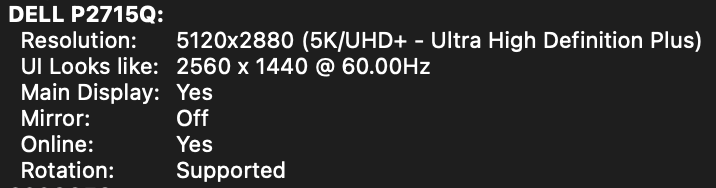
所以點話你誤解蘋果嘅hidpi,如果你的意思係話蘋果用4個像素渲染合併一個像素,就係所謂邊長2倍,咁我可以話你係冇關係,因為Mac就算使用4K mon,你行邏輯解像度(looks like)2560x1440的時候,Mac一樣係用緊5K渲染。所以點解Macbook air唔需要一定倍數先清,例如13吋Macbook pro個Mon本身就係2560x1600,但scaled resolution就係1440x900,都唔係倍數,但D舊App都依然唔會濛。


 圖片附件: Screenshot 2025-08-18 at 15.57.38.png (2025-8-18 16:02, 33.04 KB) / 下載次數 5
https://www.hkepc.com/forum/attachment.php?aid=2492395&k=a3db11b9de309cfb784dda186500281b&t=1781424926&sid=7VvWEO5rby9
作者: ARM 時間: 2025-8-18 18:16
本帖最後由 ARM 於 2025-8-18 18:38 編輯
所以點話你誤解蘋果嘅hidpi,如果你的意思係話蘋果用4個像素渲染合併一個像素,就係所謂邊長2倍,咁我可 ...
yukashing 發表於 2025-8-18 16:13
The 27″ iMac released with a 5K screen instead of a 4K screen for the most likely reason that they waned to quadruple the resolution (doubled in both directions) of their current 27″ iMac. The2013 iMac 27″ had a display resolution of 2560x1440. The new iMac moved to a resolution of 5120x2880. This essentially placed 4 pixels in the place of one pixel. They continued to do this same resolution quadrupling with the 21.5″ iMac 4K, going from 1920x1080 to 3840x2160. This quadrupling makes scaling quite simple for UI scaling.
但 upvotes 第二多嘅都係講緊同一樣野
大家都明 macos 仲有做其他野去改善清晰度問題,但你咁堅持否定 5K 嘅原因係 precise quadrupling 就有啲搞笑

作者: yukashing 時間: 2025-8-19 12:59
本帖最後由 yukashing 於 2025-8-19 13:10 編輯
但 upvotes 第二多嘅都係講緊同一樣野
大家都明 macos 仲有做其他野去改善清晰度問題,但你咁堅持否定 5K ...
ARM 發表於 2025-8-18 18:16
唔係,你講嘅嘢係唔拉更,你覺得你自己講:
「Mac直接用咗5k mon
所有app無需要做任何改動直接邊長乘200%就得」
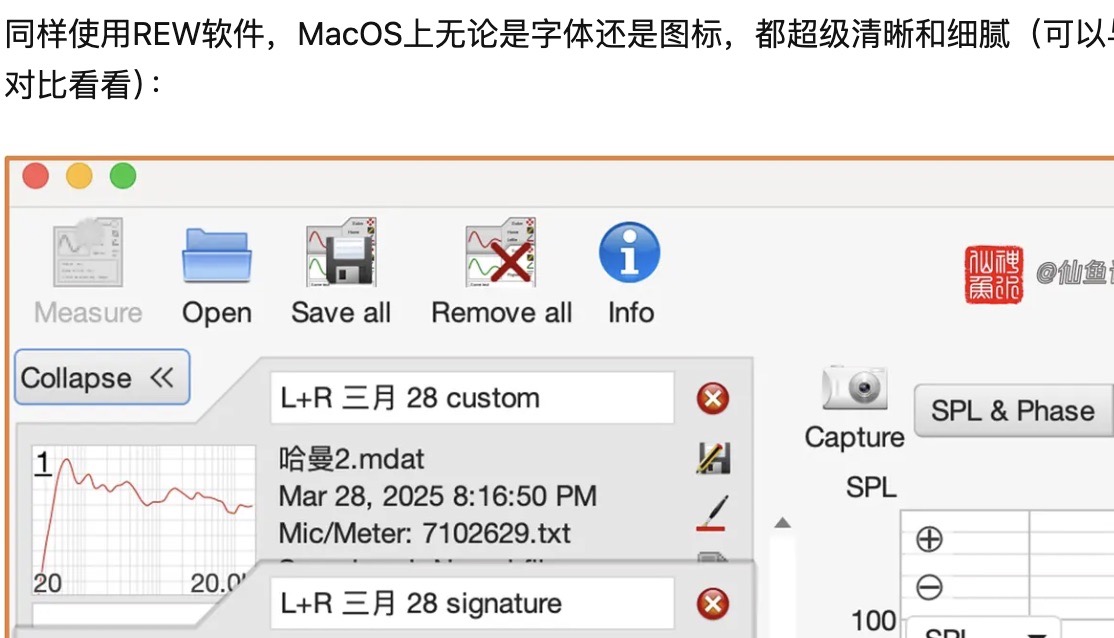
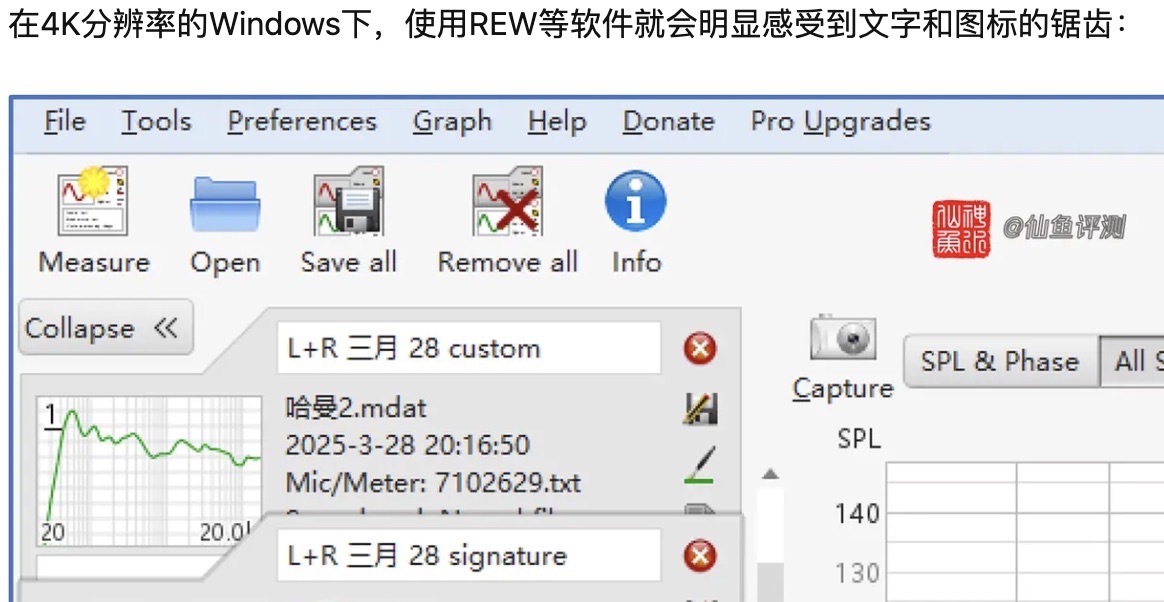
如果你認為係咁認為,(5K效果當然更好),但我係用事實話你知,如果呢樣係你講嘅200%來源,咁我行緊4K都係200%。
所以舊App Mac行更加清嘅原因,唔係5K,而係蘋果的hidpi做得好,你嘅「因為」同「所以」係唔成立。
簡單地完整地咁講:即使我唔係5K,只要符合蘋果hidpi要求,我舊App一樣咁清
圖片附件: Screenshot 2025-08-19 at 13.08.55 Large.jpg (2025-8-19 13:10, 123.08 KB) / 下載次數 8https://www.hkepc.com/forum/attachment.php?aid=2492513&k=24b68747233c76a01708d99cc87ae8bd&t=1781424926&sid=7VvWEO5rby9
 圖片附件: Screenshot 2025-08-19 at 13.08.42 Large.jpg (2025-8-19 13:10, 135.94 KB) / 下載次數 7
https://www.hkepc.com/forum/attachment.php?aid=2492514&k=cdedc50e90b69c3db4f5b71b3521ca8f&t=1781424926&sid=7VvWEO5rby9
作者: ARM 時間: 2025-8-19 14:47
唔係,你講嘅嘢係唔拉更,你覺得你自己講:
「Mac直接用咗5k mon
所有app無需要做任何改動直接邊長乘200 ...
yukashing 發表於 2025-8-19 12:59
你對Mac hidpi有誤解,Windows先係200%放大呢種方式。
而Mac係用像素合併,所以唔存在Windows嗰D App唔Support HiDPI就會濛的問題。
另外Mac唔需要一定倍數先清,例如13吋Macbook pro個Mon本身就係2560x1600,但scaled resolution就係1440x900,都唔係倍數,但D舊App都唔會濛。
yukashing 發表於 2025-8-18 10:37
真係你咁講 HiDPI 完美解決哂舊 app 模糊問題嘅
osx 10.8 嗰陣 Apple deprecated 哂堆舊 API 去迫人重寫舊 app 適應 retina 係冇野做搵野嚟做
27' 2560x1440 > 5120x2880; 21.5″ 1920x1080 > 3840x2160 又係巧合

懶得再覆,建議你直接去 quora.com 指正佢地

作者: yukashing 時間: 2025-8-20 09:58
真係你咁講 HiDPI 完美解決哂舊 app 模糊問題嘅
osx 10.8 嗰陣 Apple deprecated 哂堆舊 API 去迫人重寫 ...
ARM 發表於 2025-8-19 14:47
上面已經有晒人證物證,人哋篇嘢由頭到尾都冇提及到呢種你論述呢種咁因果關係,選擇5K係因為呢個係最好的選擇,呢種唔係巧合,係因為像素冇辦法分割,唔存在x1.2,x1.5 etc,所以倍數一定係最好效果。但蘋果的HIDPI渲染模式就係唔一定需要倍數,4K一樣可以做到呢個清晰度,而Win冇用類似方案所以點解你會話Win 5K開200%效果最好,而Mac用嘅HIDPI就唔需要,上面已經有晒貼圖,有晒用家人證,我亦無需多言。
作者: 保時捷 時間: 2025-8-22 23:07
回覆 17# yukashing
唔知佢係未玩過定點,總知 macOS 個 scaling 真係贏幾條街
另外有樣野好有趣,舊嘅 Macbook 個 default scaling 係 1280x800 但後期啲機係 1440x900
我果陣就係發現兩部機個 scaling 唔同先再留意到佢唔係整數縮放但個畫面都好清
相返 iPhone iPad 上面開 scaling 就唔掂...