
作者: LaMancha 時間: 2017-2-23 17:56 標題: excel text 長度
請問如何將cell內的文字截成固定的長度。如用right 或 left 只能固定它的字母數目,但不同字體或文字出來的長度都不一樣.
作者: 狂蜂一號 時間: 2017-2-24 19:06
請問如何將cell內的文字截成固定的長度。如用right 或 left 只能固定它的字母數目,但不同字體或文字出來的 ...
LaMancha 發表於 2017-2-23 17:56

Impossible.
You can only show them by using fixed font.
作者: C_Law 時間: 2017-2-27 17:00
本帖最後由 C_Law 於 2017-2-27 17:01 編輯
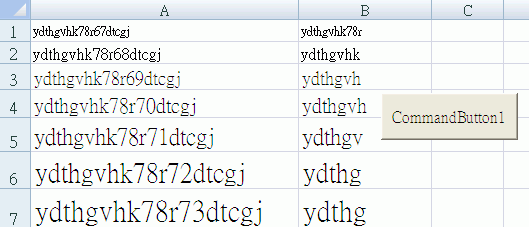
是否想做到由 Column A 變做 Column B 的效果?


上圖由 Row 1 開始,用不同 Font size 做示範(10, 12, 14, 16....etc),不同 Font、Bold、Italic...etc 都得。
做法係加個 ActiveX 的 Label 落去張 Sheet,檢查個 Label 的 Width,太闊就縮短字串。
例如用 CommandButton1,Select Column A 的一個 Cell 之後 Click CommandButton1,就會根據 myWidth 的闊度縮短字串然後放在 Column B。
- Private Sub CommandButton1_Click()
- Dim myWidth As Integer
- myWidth = 50
-
- Dim myRow As Integer
- myRow = ActiveCell.Row
-
- Label1.AutoSize = True
- Label1.WordWrap = False
- Label1.Visible = False
- Label1.Enabled = False
-
- Label1.Caption = Cells(myRow, 1)
- Label1.Font.Name = Cells(myRow, 1).Font.Name
- Label1.Font.Bold = Cells(myRow, 1).Font.Bold
- Label1.Font.Italic = Cells(myRow, 1).Font.Italic
- Label1.Font.Size = Cells(myRow, 1).Font.Size
-
- While (Label1.Width > myWidth And Len(Label1.Caption) > 1)
- Label1.Caption = Left(Label1.Caption, Len(Label1.Caption) - 1)
- Wend
-
- Cells(myRow, 2).Font.Name = Cells(myRow, 1).Font.Name
- Cells(myRow, 2).Font.Bold = Cells(myRow, 1).Font.Bold
- Cells(myRow, 2).Font.Italic = Cells(myRow, 1).Font.Italic
- Cells(myRow, 2).Font.Size = Cells(myRow, 1).Font.Size
- Cells(myRow, 2) = Label1.Caption
-
- End Sub
 圖片附件: Clipboard01.gif (2017-2-27 16:54, 12.18 KB) / 下載次數 69
https://www.hkepc.com/forum/attachment.php?aid=1963413&k=d51c3f439a534374fcc9dbfef3aeaecb&t=1781357256&sid=484xZdUbY0
作者: LaMancha 時間: 2017-3-1 10:21
是否想做到由 Column A 變做 Column B 的效果?
上圖由 Row 1 開始,用不同 Font size 做示範(10, 12, 14, ...
C_Law 發表於 2017-2-27 17:00
我意思是同樣數目字母的長度,所顯示的長度是一樣。例如 123,456.00 和 **1,234.56 的長度是一樣。在網上查了,原來有種字體叫monospace。就解決了問題。
作者: myricky 時間: 2017-3-1 15:59
提示: 作者被禁止或刪除 內容自動屏蔽
作者: LaMancha 時間: 2017-3-1 16:53
Courier new, Windows default己有, 唔洗特登搵fixed font
myricky 發表於 2017-3-1 15:59
我寫得不好。應該是有些字體是monospace。courier 是其中一種。不過我不喜歡它的字型。比較喜歡droid sans mono. 字體較圓滑。