本帖最後由 finfin 於 2018-1-13 13:17 編輯
關於下面這部 fedora的
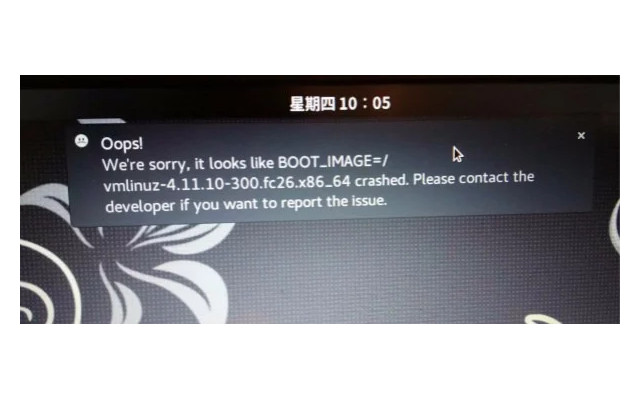
df -h
Filesystem Size Used Avail Use% Mounted on
devtmpfs 1.9G 0 1.9G 0% /dev
tmpfs 1.9G 18M 1.9G 1% /dev/shm
tmpfs 1.9G 2.0M 1.9G 1% /run
tmpfs 1.9G 0 1.9G 0% /sys/fs/cgroup
/dev/mapper/fedora-root 24G 11G 13G 46% /
tmpfs 1.9G 220K 1.9G 1% /tmp
/dev/mmcblk0p2 283M 163M 101M 62% /boot
/dev/mmcblk0p1 100M 9.5M 91M 10% /boot/efi
/dev/mapper/fedora-home 87G 20G 63G 25% /home
tmpfs 382M 20K 382M 1% /run/user/42
tmpfs 382M 5.8M 376M 2% /run/user/1000
sudo fdisk -l
Disk /dev/mmcblk0: 116.5 GiB, 125069950976 bytes, 244277248 sectors
Units: sectors of 1 * 512 = 512 bytes
Sector size (logical/physical): 512 bytes / 512 bytes
I/O size (minimum/optimal): 512 bytes / 512 bytes
Disklabel type: gpt
Disk identifier: 25EF9B5D-DAF9-45B8-AEFB-456AC52C995B
Device Start End Sectors Size Type
/dev/mmcblk0p1 2048 206847 204800 100M EFI System
/dev/mmcblk0p2 206848 821247 614400 300M Linux filesystem
/dev/mmcblk0p3 821248 244275199 243453952 116.1G Linux LVM
Disk /dev/mmcblk0boot1: 4 MiB, 4194304 bytes, 8192 sectors
Units: sectors of 1 * 512 = 512 bytes
Sector size (logical/physical): 512 bytes / 512 bytes
I/O size (minimum/optimal): 512 bytes / 512 bytes
Disk /dev/mmcblk0boot0: 4 MiB, 4194304 bytes, 8192 sectors
Units: sectors of 1 * 512 = 512 bytes
Sector size (logical/physical): 512 bytes / 512 bytes
I/O size (minimum/optimal): 512 bytes / 512 bytes
Disk /dev/mapper/fedora-root: 24.2 GiB, 26000490496 bytes, 50782208 sectors
Units: sectors of 1 * 512 = 512 bytes
Sector size (logical/physical): 512 bytes / 512 bytes
I/O size (minimum/optimal): 512 bytes / 512 bytes
Disk /dev/mapper/fedora-swap: 3.9 GiB, 4135583744 bytes, 8077312 sectors
Units: sectors of 1 * 512 = 512 bytes
Sector size (logical/physical): 512 bytes / 512 bytes
I/O size (minimum/optimal): 512 bytes / 512 bytes
Disk /dev/mapper/fedora-home: 88 GiB, 94501863424 bytes, 184573952 sectors
Units: sectors of 1 * 512 = 512 bytes
Sector size (logical/physical): 512 bytes / 512 bytes
I/O size (minimum/optimal): 512 bytes / 512 bytes
關於下面這部ubuntu的
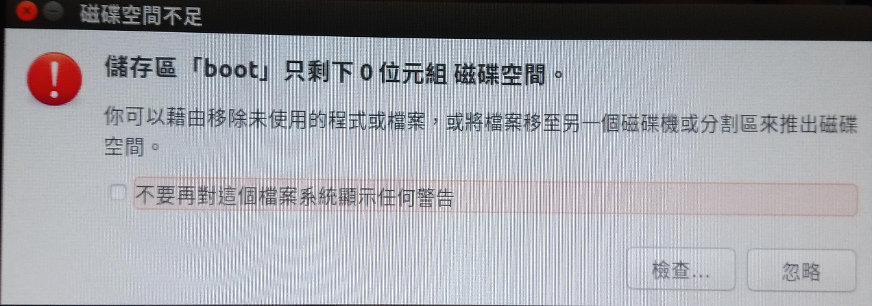
df -h
檔案系統 Size 已用 Avail Use% 掛載點
udev 1.9G 0 1.9G 0% /dev
tmpfs 383M 6.5M 377M 2% /run
/dev/sdb1 26G 8.6G 16G 36% /
tmpfs 1.9G 8.0K 1.9G 1% /dev/shm
tmpfs 5.0M 4.0K 5.0M 1% /run/lock
tmpfs 1.9G 0 1.9G 0% /sys/fs/cgroup
/dev/loop0 84M 84M 0 100% /snap/core/3748
/dev/loop1 84M 84M 0 100% /snap/core/3440
/dev/loop2 84M 84M 0 100% /snap/core/3604
/dev/loop3 236M 236M 0 100% /snap/chromium/123
/dev/loop4 141M 141M 0 100% /snap/chromium/128
/dev/loop5 236M 236M 0 100% /snap/chromium/88
/dev/sdb7 84G 2.6G 78G 4% /home
/dev/sdb5 268M 260M 0 100% /boot
tmpfs 383M 148K 383M 1% /run/user/1000
sudo fdisk -l
Disk /dev/loop0: 83.8 MiB, 87863296 bytes, 171608 sectors
Units: sectors of 1 * 512 = 512 bytes
Sector size (logical/physical): 512 bytes / 512 bytes
I/O size (minimum/optimal): 512 bytes / 512 bytes
Disk /dev/loop1: 83.7 MiB, 87793664 bytes, 171472 sectors
Units: sectors of 1 * 512 = 512 bytes
Sector size (logical/physical): 512 bytes / 512 bytes
I/O size (minimum/optimal): 512 bytes / 512 bytes
Disk /dev/loop2: 83.8 MiB, 87896064 bytes, 171672 sectors
Units: sectors of 1 * 512 = 512 bytes
Sector size (logical/physical): 512 bytes / 512 bytes
I/O size (minimum/optimal): 512 bytes / 512 bytes
Disk /dev/loop3: 235.4 MiB, 246804480 bytes, 482040 sectors
Units: sectors of 1 * 512 = 512 bytes
Sector size (logical/physical): 512 bytes / 512 bytes
I/O size (minimum/optimal): 512 bytes / 512 bytes
Disk /dev/loop4: 140.9 MiB, 147763200 bytes, 288600 sectors
Units: sectors of 1 * 512 = 512 bytes
Sector size (logical/physical): 512 bytes / 512 bytes
I/O size (minimum/optimal): 512 bytes / 512 bytes
Disk /dev/loop5: 235.4 MiB, 246800384 bytes, 482032 sectors
Units: sectors of 1 * 512 = 512 bytes
Sector size (logical/physical): 512 bytes / 512 bytes
I/O size (minimum/optimal): 512 bytes / 512 bytes
Disk /dev/sda: 1.8 TiB, 2000398934016 bytes, 3907029168 sectors
Units: sectors of 1 * 512 = 512 bytes
Sector size (logical/physical): 512 bytes / 4096 bytes
I/O size (minimum/optimal): 4096 bytes / 4096 bytes
Disklabel type: dos
Disk identifier: 0xe115c18f
Device Boot Start End Sectors Size Id Type
/dev/sda1 * 2048 2048002047 2048000000 976.6G 7 HPFS/NTFS/exFAT
Disk /dev/sdb: 119.2 GiB, 128035676160 bytes, 250069680 sectors
Units: sectors of 1 * 512 = 512 bytes
Sector size (logical/physical): 512 bytes / 512 bytes
I/O size (minimum/optimal): 512 bytes / 512 bytes
Disklabel type: dos
Disk identifier: 0xd717cd65
Device Boot Start End Sectors Size Id Type
/dev/sdb1 * 2048 54687743 54685696 26.1G 83 Linux
/dev/sdb2 54689790 250068991 195379202 93.2G 5 Extended
/dev/sdb5 54689792 55273471 583680 285M 83 Linux
/dev/sdb6 55275520 70383615 15108096 7.2G 82 Linux swap / Solaris
/dev/sdb7 70385664 250068991 179683328 85.7G 83 Linux
唔該各位。 |
 簡體版
簡體版 訂閱頻道
訂閱頻道 訂閱電子報
訂閱電子報






 發表於 2017-12-28 10:12
|
發表於 2017-12-28 10:12
| 


