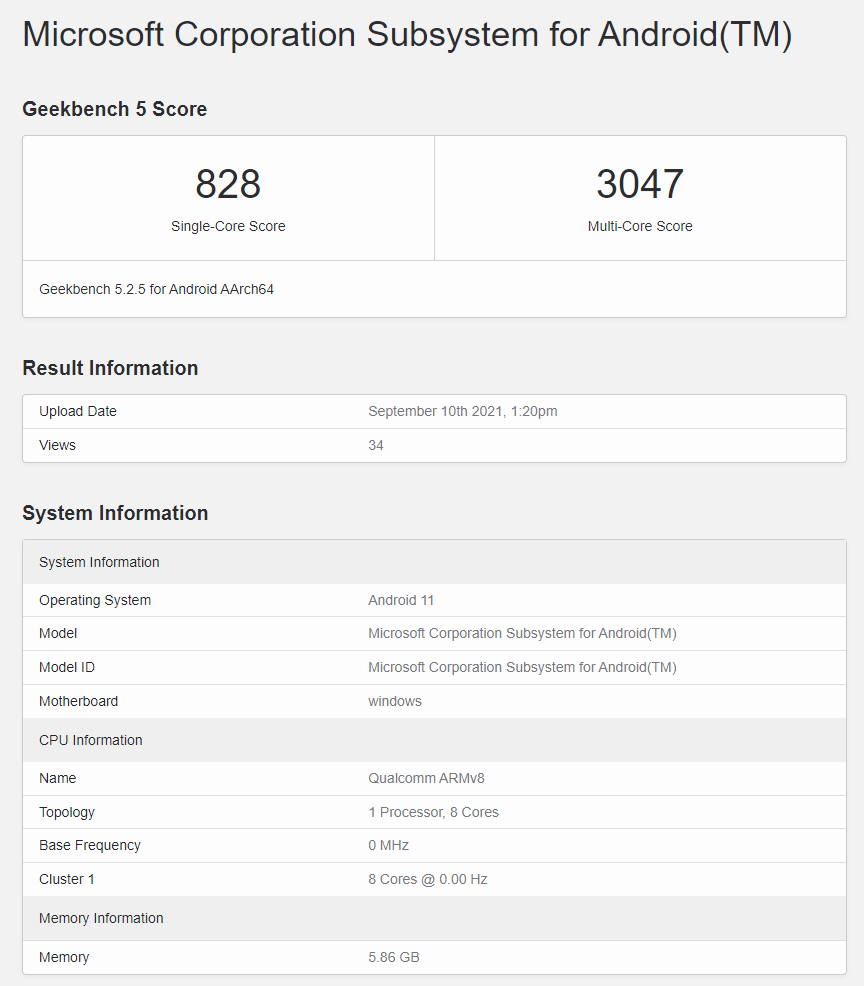
本帖最後由 javacomhk 於 2022-9-15 08:39 編輯
Windows 11 最新版本 February 15, 2022—KB5010414 (OS Build 22000.527) 可以安裝 Windows Subsytem for Android (WSA)
安裝 WSA 需要先將 Windows 11 設定美區及有SSD 及有8GB RAM, 更新 Microsoft Store 版本及安裝 Amazon appstore 及同時亦安裝WSA. (安裝 Amazon appstore這點可能會不成功)
符合唔到以上條件,例如只有 4GB RAM 或符合不到其他例如 CPU, TPM,Secure Boot 等要求,要強行安裝就要下載以下安裝檔案, 参考 https://pureinfotech.com/install ... oid-wsa-windows-11/
1. 要成功更新 Windows 11 KB5010414後重啟。
2. 在 Settings 搜尋及在 Turn Windows features on or off 去開啟 Virtual Machine Platform (虛擬機器平台)。另外 BIOS 需要 enable Hardware virtualization。開啟虛擬機器平台後需要重啟Windows。Windows Subsystem for Android 並不需要 Windows Hypervisor Platform 或 Hyper-V 。
[img]https://i3g4v6w8.stackpathcdn.com/wp-content/uploads/2021/10/virtual-machine-platform-opti
另外: Hyper-V 在 Windows 10 Pro 已經有,如果係 Windows 10 Home 沒有Hyper-V而需要安裝的話,可參考這篇去安裝 https://www.itechtics.com/enable-hyper-v-windows-10-home 。但係現時 WSA 只需要 Virtual Machine Platform就可以。有了Hyper-V 可以加速運行另一的 VM,例如在 Android Studio App下的 x86 Emulator。有些 Windows App 例如 Docker Desktop for Windows 便一定要有 Hyper-V。
3. Browser 去到 https://store.rg-adguard.net 網址去下載 WSA Package
4. 下載Microsoft Amazon Store 版本,選擇 Productid , 加入 ID: 9p3395vx91nr 選擇 Slow 然後按 ✔ 按鈕.

Copy & Paste 上面 Productid 時要留意不要有空格在尾
5. 向下捲動後選擇下載 MicrosoftCorporationII.WindowsSubsystemForAndroid_2203.40000.1.0_neutral_~_8wekyb3d8bbwe.msixbundle (1.21GB)
MicrosoftCorporationII.WindowsSubsystemForAndroid_2207.40000.8.0_neutral_~_8wekyb3d8bbwe.msixbundle
(現時最新版本)
6. 如Browser下載不成功需要用 Chrome Browser 下載及選[保留 Keep]
或使用以下直接下載連結
http://tlu.dl.delivery.mp.microsoft.com/filestreamingservice/files/d81456bd-ee18-43b1-8257-626d01eb2409?P1=1647149672&P2=404&P3=2&P4=Wp0VUvnN8KIpSgfSlWKkDGVhmDyzrmd8z20n7LMTJYL6viW92zgsIuStD43OcUf%2bEdeGYn1MBfPNeY99Vt4TfQ%3d%3d
http://tlu.dl.delivery.mp.microsoft.com/filestreamingservice/files/b1b323e0-7860-4609-b06b-e4667c9c8bfe?P1=1663258661&P2=404&P3=2&P4=WDTlAG4VjswIcrWv8gA%2fJE6WYGcp%2fL7pIZ2QTEWBUk95nBzjSsOslLuL3kqOHJD6i8A6Fi5s5vCX866HzPbhpA%3d%3d
7. 用 Powershell (Run as administrator),輸入以下指令- cd $env:UserProfile\Downloads\
- Add-AppxPackage Add-AppxPackage .\MicrosoftCorporationII.WindowsSubsystemForAndroid_2207.40000.8.0_neutral_~_8wekyb3d8bbwe.msixbundle
8. 如果要下載 WSA 有 Google Play Store 版本(但係要留意,少RAM 就唔好試,會比沒Google Play 版慢的),下載可以參考 https://github.com/LSPosed/MagiskOnWSA.
WSA-with-magisk-GApps-pico_1.8.32837.0_x64_Release-Nightly (2.69 GB)
https://github.com/LSPosed/Magis ... artifacts/168814351
最新 Google Play Store 版本
https://github.com/AdityaAgarwal539/MagiskOnWSA-1/actions
最新 Google Play Store 版本下載
https://github.com/AdityaAgarwal ... ons/runs/2854889812
安裝這個Package 要開 Developer Mode
用 Powershell (Run as administrator),輸入以下指令- cd $env:UserProfile\Downloads\WSA-with-magisk-GApps-pico_2205.40000.21.0_x64_Release-Nightly
- Set-ExecutionPolicy -ExecutionPolicy Unrestricted
- .\Install.ps1
9. 在Microsoft Store 搜尋 Windows Subsystem for Android 然後開啟 Open.


10. 成功開啟後,然後可以根據這篇去side load 你在 APKMirror / APKPure 下載的 apk 檔案
参考https://www.thewindowsclub.com/h ... sing-wsa-on-windows
從這 https://developer.android.com/studio/releases/platform-tools
下載 Download SDK Platform-Tools for Windows 到 Downloads 後解壓
11. 搜尋 Windows Subsystem for Android Settings 及開啟 WSA Settings 的 Developer Mode 及 Copy IP address
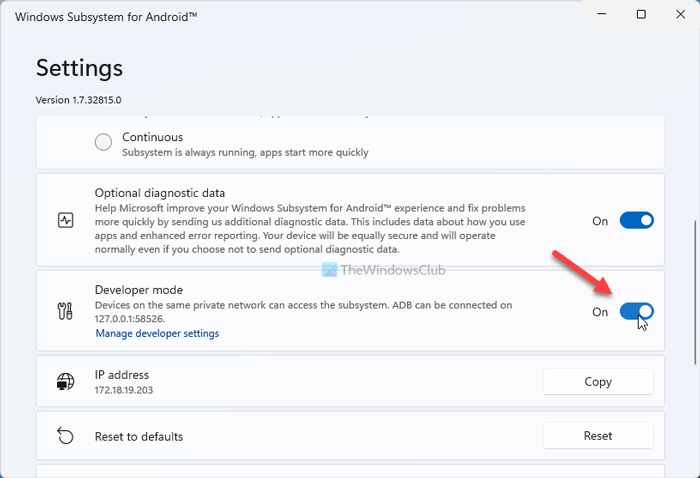
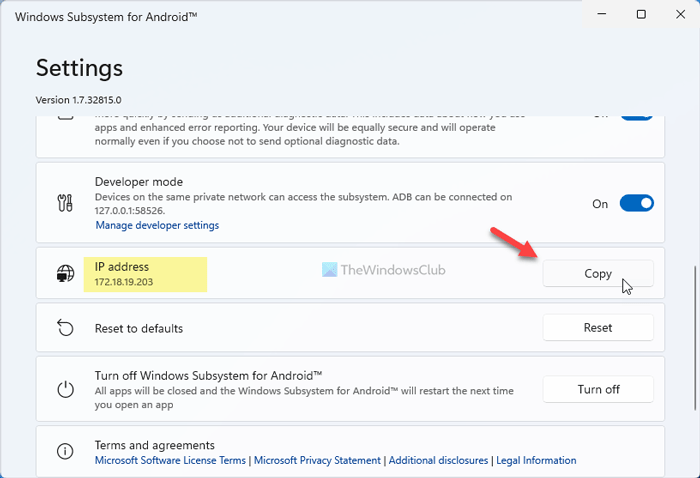
最新版本,可在 Settings 內選用電腦的 GPU 卡去加速圖像顯示。
12. 下載所需的 APK, 例如從 APKMirror / APKPure 下載, 及在Command Prompt 輸入指令- cd %USERPROFILE%\Downloads\platform-tools_r32.0.0-windows\platform-tools
- ::[即你剛才 copy WSA Settings 畫面 的 IP 地址]
- adb.exe connect 172.18.19.203
- ::[即你下載在Downloads folder 的 APK 檔案名]
- adb.exe install %USERPROFILE%\Downloads\*.apk
星火行到
Termux 都行到
港人話電視要安裝V96版,下載網址:
https://hktvapp.com/install.html
https://github.com/AdityaAgarwal ... ons/runs/2854889812
最新 Google Play Store 版本 WSA2205
|
 簡體版
簡體版 訂閱頻道
訂閱頻道 訂閱電子報
訂閱電子報




 發表於 2022-2-22 00:51
|
發表於 2022-2-22 00:51
|